In the dashboard
Add, edit and review everything on the web, on any device. Envelopes, accounts, bills, goals and reports live here.
Every plan
BudgeFlow is a complete envelope-budgeting app: accounts, bills, goals, reports and shared budgets in one dashboard. Log spending there, or text it in and get back what is left in seconds, so you can budget without downloading another app on any device. Connect a bank when you want less typing — optional, read-only, and it never double-counts what you already logged.
The dashboard: everything in one place, on any device
Live demo — type coffee 5.80 and press send
Add, edit and review everything on the web, on any device. Envelopes, accounts, bills, goals and reports live here.
Every plan
Send “coffee 5.80” and get back what is left. Five seconds, no app to open. WhatsApp works too on Pro and Max.
SMS on every plan, WhatsApp on Pro and Max
Optional and read-only. Transactions wait in a review list until you approve them, and never double-count what you logged.
Pro and Max
Envelope budgets, accounts and transfers, bills and subscriptions, goals and debts, reports and exports, all in one dashboard that works on any device. Text entries land in the same place, so you can use whichever is faster in the moment.

Dashboard, text message, WhatsApp on Pro and Max. Expenses, income, cash, forwarded bank alerts.

Envelopes with rollover and available-to-assign.

Categorisation and merchant memory.

Alerts, bill reminders, month-end forecasts.

Shared budgets, IOUs, bill splitting, invites.

Accounts, transfers, cards, reports, goals, debts.
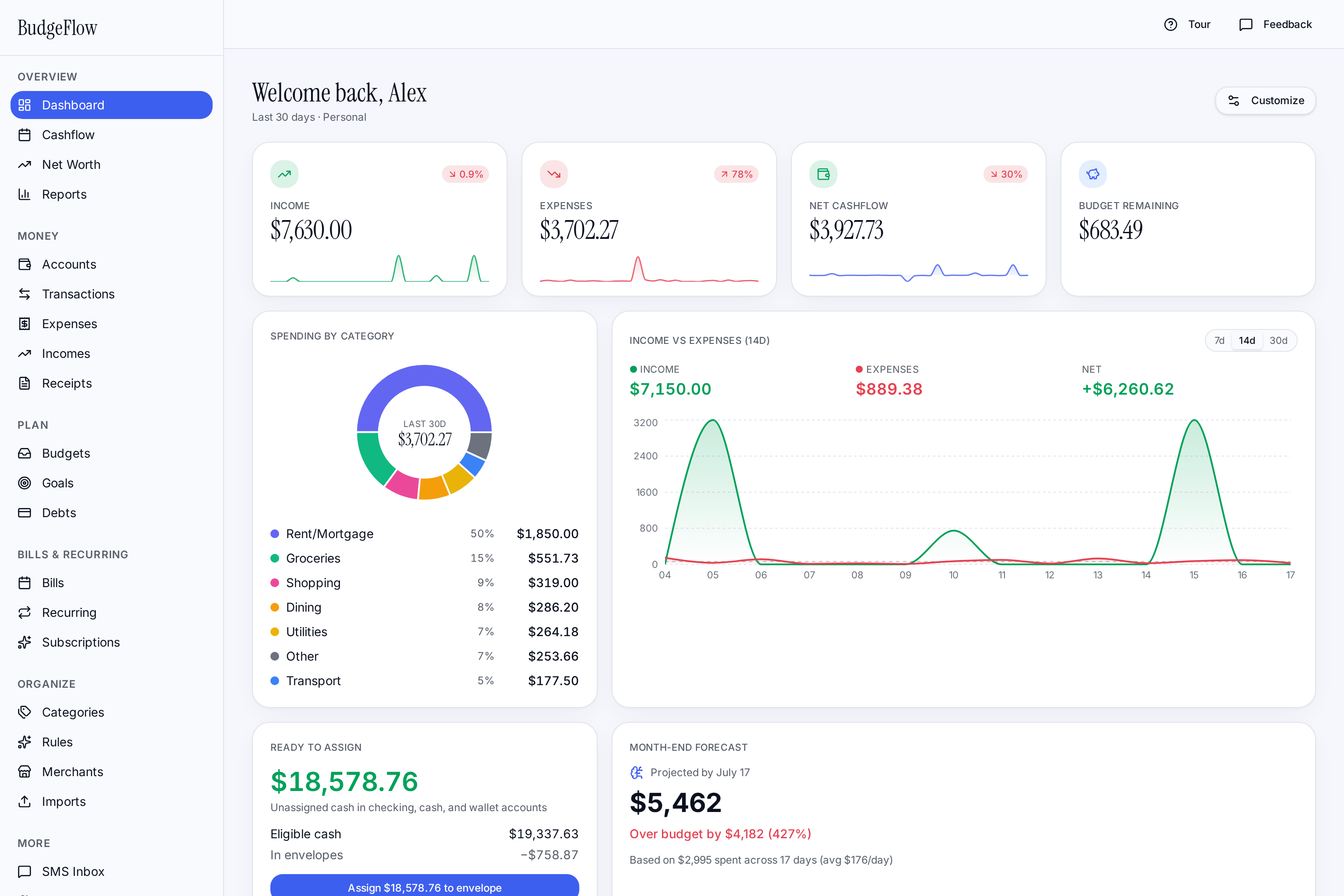
Log a purchase in the dashboard or from the messaging app you already use fifty times a day. Either way the budget ends in a number you can act on, while there is still time to change course.
In the dashboard, or by text in plain language, a merchant name, or a short command. SMS on any plan, WhatsApp on Pro and Max.
Name the category in your text, or on Pro and Max let AI categorization and merchant rules file it and remember your corrections.
Assigned, spent, remaining, percent used and rollover recalculate the moment the entry lands.
Budget alerts, bill reminders and month-end forecasts arrive while you can still change course.
“Dining is 78% used with 11 days left. $34 remaining.”
The alert arrives while you can still change the outcome — not in a monthly report after the money is gone.
An optional shortcut for the moments you are away from the dashboard. Natural language, merchant names, inline category hints, or terse commands all work from one thread on SMS, or WhatsApp on Pro and Max.
See what each plan includesConnect a bank and BudgeFlow lines up posted transactions with what you already texted. Out of the box everything waits for you in review — and if you'd rather it handled the obvious ones, that's a setting you turn on, not a default you have to catch.
Out of the box, every transaction waits in a review list. Turn it up when you trust it: get a text listing what it would add, or let it add the confident ones for you. Anything uncertain still waits.
Texted "48 home depot" on Tuesday? When the charge posts, BudgeFlow matches it to what you already logged and links the two, instead of adding it twice.
You sign in through Plaid's own window, so your bank password goes to Plaid and never to BudgeFlow. What we hold is an encrypted read-only token, behind two-factor authentication, that you can revoke whenever you want.
Banks post transactions on their own schedule — usually once or twice a day, not the second you swipe. Text it if you want it tracked now.
Every new transaction waits for your decision in Transactions. Nothing is added automatically.
Texts you one message listing what it would add, and waits. Reply OK to take them all, NO to skip, or EDIT 2 cat Groceries to change one.
Adds confident, categorized transactions on their own. Anything uncertain — no category, a possible duplicate, a bill it might be paying — still waits for you.
Transfers and card payments are their own switch, also off to begin with. Records the transfer when two rows can only be the same movement — same amount, opposite directions, within four days, and nothing else either one could be paired with. Your bank doesn't tell us the two sides belong together, so anything less certain waits for you in review.
Three jobs people do not expect a simple budgeting app to do, and which plan includes each.
Send a photo or forward the email receipt and BudgeFlow's AI scanning reads it. Log business miles the same way, so the records are in one place at tax time.
Up to 100 receipts a month.
See what Max includesSee where the month is heading and get a warning before an envelope runs out, not a report after the money is gone.
Every plan gets budget alerts. Predictions and overspending warnings are the upgrade.
See the budget trackerKeep checking, cash and credit cards side by side, move money between them, and text for your balances.
Account commands work by text too.
See credit card trackingWhether you forget expenses, avoid bank linking, split bills, or use cash, BudgeFlow gives you a short text command and a clear next signal.
Text the expense before the receipt even hits your pocket, or add it in the dashboard later. BudgeFlow categorizes it and updates your budget.
Envelope progress and alerts show when a category is getting tight while there is still time to adjust.
Shared budgets and IOUs keep household spending, reimbursements, and split bills in one place.
Log by hand in the dashboard or by text when you want awareness without handing over bank credentials.
Cash purchases, reimbursements, and side income can live beside card spending and account activity.
Create envelope budgets, check available cash, and move money between categories by text.
Connect a bank on Pro or Max and BudgeFlow lines up what posts with what you already texted. Out of the box, everything waits in a review list until you approve it.
Auto-fund goals, schedule recurring bill reminders, and let AI handle expense categorization. Spend less time inside the app and more time on the things money is supposed to buy.
Set a recurring amount and a day-of-month, and BudgeFlow funds the goal automatically — either as a real account transfer or a Ready-to-Assign earmark.
See how envelope saving worksTrack rent, subscriptions, and credit-card due dates. Get a text the day before so nothing slips through the cracks.
See bill reminders by textOn Pro and Max, expenses land in the right category without manual tagging. Add merchant rules to lock behaviour and let automation do the boring work.
See how categorization worksLog everyday spending in seconds and see what is left before the next purchase.
Share budgets, split costs, and keep household money visible without constant app check-ins. Sharing is on Pro and Max.
Log income and client-project spending in the dashboard or by text. Receipt scanning and mileage tracking come with Max.
Share budgets, split costs, and keep group spending visible to everyone who needs it, on Pro and Max.
An honest side-by-side, including the places where the others are still the better tool. Bank sync is optional here and read-only when you use it — the difference is that BudgeFlow still works fully without one.
on annual billing than the cheaper of YNAB and Monarch.
$5.99/mo · web dashboard, text logging, envelopes, bills, goals, reports.
Bank sync and a mature envelope system — inside an app you have to open.
Strong dashboards and investment tracking, no text-message capture.
3 features neither YNAB nor Monarch offers.
| Capability | BudgeFlow | YNAB | Monarch |
|---|---|---|---|
| Starting price | $5.99/mo | $14.99/mo | $14.99/mo |
| Annual price | $60/yr | $109/yr | $99.99/yr |
| Free trial | 14 days, no card | 34 days | 7 days |
| Log expenses by SMSOnly here | |||
| Log expenses by WhatsAppOnly here | Pro | ||
| Works without downloading an app | |||
| Usable without a bank login | Manual entry | Manual entry | |
| Envelope / zero-based budgeting | Category budgets | ||
| Bill splitting & IOUs by textOnly here | Pro | ||
| Shared household budget | Pro | ||
| Automatic bank transaction sync | Optional, read-only | ||
| Investment tracking |
Competitor pricing and features as of June 2026, from each vendor's public pricing and help pages. Entry tiers compared. Plans change — check theirs before deciding.
14-day trial, no card. Cancel from billing in one click.
Solo budgeting on the web and by text, with the core finance tools.
Accounts, AI, sharing and insights, plus WhatsApp.
750 text segments a month and automated receipt capture.
What happens after you start
Compare message credits, WhatsApp, AI categorization, shared budgets, account tools, and reports.
On both plans: full app access, core dashboard, expenses, incomes, categories, budgets / envelopes, bills, subscriptions, goals, basic reports, file import / export.
| Feature | Basic | Pro | Max |
|---|---|---|---|
| Price | $5.99/mo | $10.99/mo | $19.99/mo |
| Text message credits | 100/mo | 250/mo | 750/mo |
| No | Yes | Yes | |
| Budget alerts | Basic | Advanced | Advanced |
| Account management | No | Yes | Yes |
| Account tools | No | Yes | Yes |
| Transfers | No | Yes | Yes |
| Credit cards | No | Yes | Yes |
| Total balances | No | Yes | Yes |
| Account commands by text | No | Yes | Yes |
| AI categorization | No | Yes | Yes |
| Automatic category rules | No | Yes | Yes |
| Forwarded bank alert logging | No | Yes | Yes |
| Projects | No | Yes | Yes |
| Project tracking by text | No | Yes | Yes |
| IOU / bill splitting | No | Yes | Yes |
| Receipt capture | No | No | Yes |
| AI receipt scanning | No | No | Yes |
| Email / MMS / WhatsApp receipt intake | No | No | Yes |
| Photo attachments | No | No | Yes |
| Mileage tracking | No | No | Yes |
| Priority support | No | No | Yes |
| Spending predictions | No | Yes | Yes |
| Overspending warnings | No | Yes | Yes |
| Monthly Wrapped | No | Yes | Yes |
| Achievements / streaks | Limited | Yes | Yes |
| Bank connections | No | Up to 5 | Up to 10 |
BudgeFlow Basic is $60/yr — the same envelope method, with no app to open.
BudgeFlow is useful without bank linking, keeps sharing explicit, and uses Stripe for subscription billing.
The dashboard and texting both work with no bank at all. If you connect one, you sign in through Plaid, so BudgeFlow never sees your bank password, and access is read-only.
Invite only the people who should see or help manage a shared budget.
Card billing is handled through Stripe, so BudgeFlow does not store card numbers.
Manage your subscription from billing without a long cancellation flow.
Still unsure? The trial takes 14 days and no card, which is a faster answer than any FAQ.
No. BudgeFlow is a full web app: envelopes, accounts, bills, goals, reports and shared budgets all work from the dashboard on any device. Texting is an optional shortcut for logging a purchase in a few seconds.
No. You can log expenses, income, cash spending and budgets in the dashboard or by text without connecting a bank. Bank sync is optional, read-only and available on Pro and Max.
Yes. WhatsApp is included on the Pro and Max plans, with the same budgeting commands you use over SMS.
Credits cover the SMS messages BudgeFlow sends and receives for your workspace each month. Basic includes 100, Pro includes 250, and Max includes 750 outbound segments a month.
Yes. Pro includes shared budgets, invites, roles, IOUs and bill splitting for household or team spending.
Partly. On every plan you can name the category in your text. Pro and Max add AI categorization and automatic category rules that file a merchant for you and remember your corrections.
Yes. You can cancel from billing and keep access through the end of your current billing period.
Each guide has a separate job, so search engines and readers can tell the difference between the product, the method, expense tracking, app-free budgeting, envelope budgeting, and YNAB comparisons.
Pick a plan, then log your first expense in the dashboard, or verify your phone in setup to log by text. The budget builds itself from there.